 Scrolling Stories
Phone and desktop
Composing for portrait as well as landscape.
Portrait and landscape
Readers hold a phone upright, or sideways, or open the story in a wide window on a computer. A story is designed for one of two shapes, Portrait or Landscape. In the story panel, Designed for, under Reading, sets it. A reader whose device is held the other way is asked to turn it.
On a computer, the two buttons beside the preview show the story in your window or in a phone's shape.
Composing the second shape
If you want portrait readers to get a version made for them, compose the story a second time. The beats stay the same, and you arrange them again for the other shape.
- Turn on Also compose for portrait, in the story panel under Reading, or in the bar above the preview. For a story designed for portrait, it reads Also compose for landscape.
- Switch the preview to the other shape with the buttons beside the switch. They now read Landscape and Portrait. The panel's head says Composing for portrait while you are in the second shape.
- Change what you want. Select a beat, and move its text, change its motion or its look.
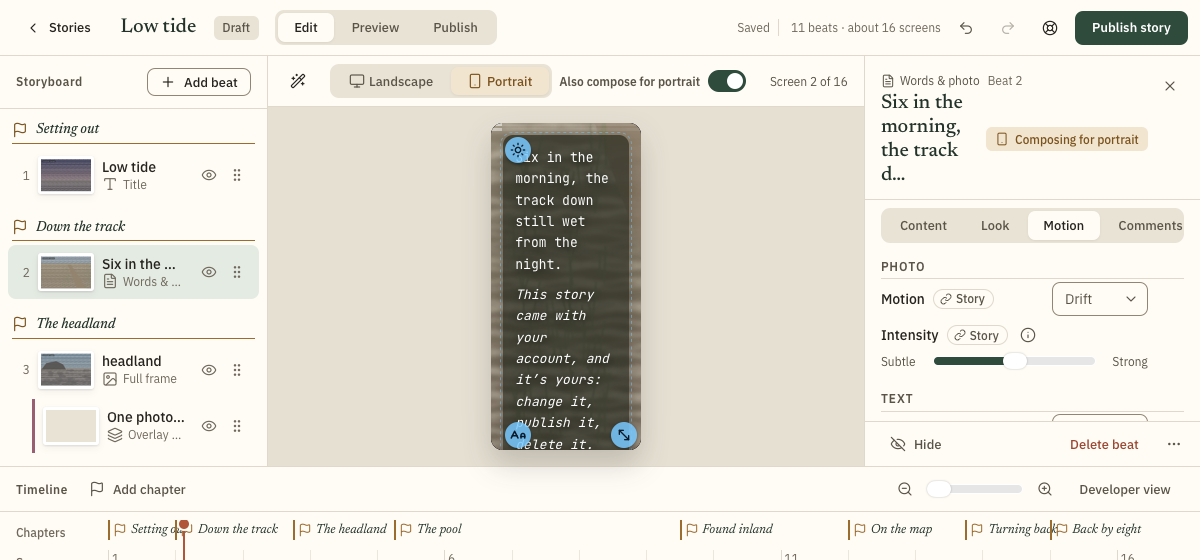
A beat you have changed for the second shape shows a button at the foot of its panel, Follow landscape, which puts it back to the first shape's values.
What is shared
Style, motion and position changes apply only to readers in the second shape. Words and photos are shared.
- Shared: the beats and their order, how long each lasts, the words, the photos, the chapters, and a beat's or page's font and box. While you compose the second shape, Pace and Runs across are hidden, because they can't differ.
- Can differ: a beat's motion, intensity, transition, look, text style, text position and animation, a photo's focus point, a map's camera and zoom, and a page's side. The story's defaults can differ too, including the size and width of text.
Turning it off
Turn the switch off, and readers in the second shape are asked to turn their device again. What you composed is kept, and comes back when you turn the switch on. A message after you turn it off says so, and Undo restores it.
To throw away what you composed and start again, press the reset button beside the switch in the story panel, Start the portrait version again. For a story designed for portrait, it reads Start the landscape version again. Every beat and the story's defaults follow the first shape again, apart from each page's side. A message says so, and Undo brings it all back.